
I use wireless networking on Arbopeep, my Lenovo X200 Thinkpad laptop running the eComStation operating system. The network interface is an Intel 5100 802.11agn wireless network adapter. The eCS installation program does not recognize the wireless network adapter, so I added support manually.
The Intel 5100 802.11agn wireless network adapter is the first, and so far, the only wireless network adapter to support 802.11n.
To add the wireless support, I install GenMac 2.20 with only basic support selected. I then install GenMU with just the Intel 5100 selected. I then install xwlan by unzipping the archive and running instwgt. Finally I use yum to install dhclient. After installing all this, I reboot the laptop.
While the computer is rebooting, I access BIOS and make sure that BIOS is set to Power->Battery->Maximum Performance, and that Intel SpeedStep is enabled. After this change, the computer must be powered off, then on.
When the laptop is booted again, I add the XWLAN widget to the eCenter, and make sure the XWLAN properties are set to Deactivate the radio on startup.
It works!!! But not every time. I use the following procedure when starting to use wireless networking.
Once the WiFi is working, it works for hours, and I have not yet seen it fail.
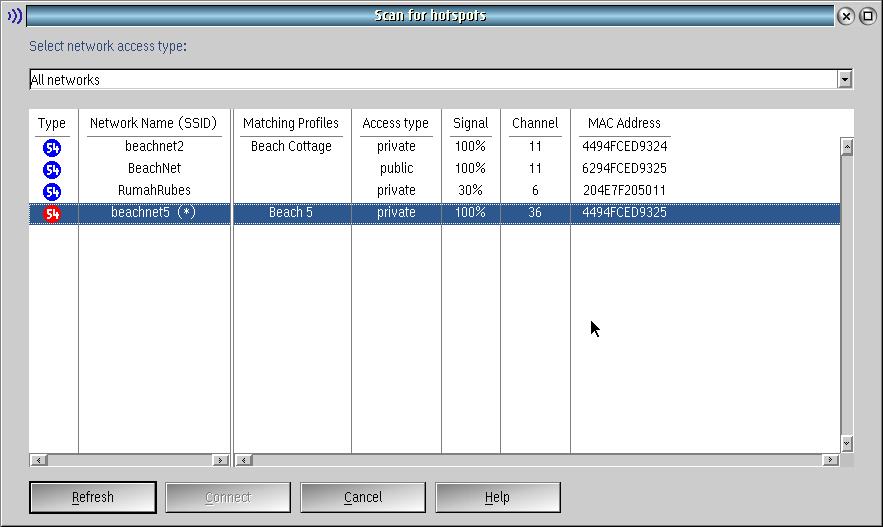
The following screen shot shows the 5 GHz connection in red. The connection shows as 54 Mbit in the screen shot, but hovering over the XWLan icon shows a connection at 300 Mbit."
The following links show where the software that was used to configure wireless networking. I also used RPM/YUM. See the readme for xwlan for instructions to install dhclient without RPM/YUM.
 |
genmac220.wpi The GenMac base driver. |
|
|
GenMU-0-4-5.wpi The Intel 5100 driver (updated link). |
|
|
xwlan312.zip The xwlan software (updated link). |
The following sections are from the 2005 edition of this webpage, before GenMac had WiFi support.
I use wireless 802.11b networking on my IBM ThinkPad T30 notebook computer. This essay describes how I set it up, and how I use it.
For now, there are few supported cards for 802.11b networking under OS/2 and eComStation. I have two of them, an AmbiCom WL1100B, and a Cisco AIR-PCM350. While both cards work, only the AmbiCom can be used on WEP encrypted networks.
The AmbiCom is supported by the GenPrism driver. This driver supports many of the Prism wireless chipsets, so you can browse a list of the supported cards for this driver.
The Cisco is supported by a Cisco driver. This driver supports a few Cisco 350 and Cisco 340 cards. This driver does not support WEP encrypted networks.
Obtain the appropriate drivers, and copy them to the \IBMCOM\MACS directory. Start MPTS, or "Adapters and Prototcols", and add the driver or drivers to your netorking stack. Add the IBM TCP/IP protocol to each one. When you are done, your screen should look something like this.
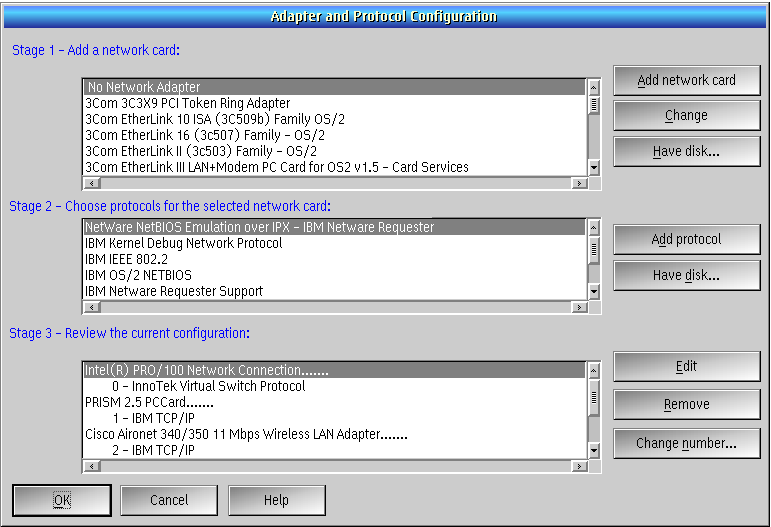
Note: please ignore the Innotek Virtual Switch Protocol in the above, bound to my wired NIC. The important configuration here is to have your wired and your wireless adapters all supported by MPTS at the same time. You need to save the changes and reboot.
Install the Wireless Lan Monitory, or XWLAN, by Christian Langanke. I use the XCenter widget. In the properties for XWLAN, it is necessary to configure the Device and TCP/IP tabs. Pick the appropriate interface for the wireless card. In my case, I used LAN1 for my Ambicom card and LAN2 for my Cisco card.
With the computer so configured, you will be able to insert your wireless card and attempt a connection. The first time you run the wireless card, you'll need to select your wireless device, and create a profile.
The profile I created has a name, and nothing else. With the SSID left blank, the Wireless LAN Monitor seems happy to find the strongest signal and connect to it. I kept DHCP, because this is what providers in my area seem to expect. This set up works in many locations.
The Wireless LAN Monitor will run a script when it makes or breaks a connection. I am providing a script to it, although wireless networking would work fine without it. The script merely turns off the File and Print client on connect and restarts DHCP on the wired connection on disconnect.